| Click here for Home Page to see List of All My Trips and Three Methods to search my Travelogue website for web pages of interest to you |
| The Beauty and Joy of Nature Conveyed Through Your Own Travelogue Website |
1. The Joy and Beauty of Life and Nature
Retirees have the luxury to slow down, to listen, to observe, to create, and to spot life's many beautiful
moments; and they stop at those precious moments to enjoy them thoroughly through their capacity for
passion. There is much to taste of life in the “now”. So enjoy the experience. Live more in your heart and less in
your head. Dream more while you are awake. No one is in charge of your happiness except you. Enjoy the
best of humanity and the best of nature. Live every moment with Joy and Peace. Many of us never lose our
sense of wonder - a passion for exploration and discovery. They enjoy sightseeing trip frequently and take
many nice pictures and movie clips of those wonderful moments.
退休啊,是如此安詳、淡定、逍遙!
沒有了學業的壓力,
沒有了謀生的辛勞,
沒有了功名利祿的誘惑,
夕陽無限好, 珍惜吋光陰,
退休的人生啊,是如此從容、真實、美好!
每一天都是節日,每一天都是假日,每一天都是自由日!
每一天都是藝術節,每一天都是旅遊節,
從心所欲神仙境,
退休以後學會「慢城」哲學新潮流的慢生活,讓生活節奏回歸自然, 回歸心靈, 細細的品味享受典雅優質
的安逸生活, 過得從容,活得瀟灑, 柳暗花明又一村,過起了自由、輕鬆、自助、自信的老年生活:遊山
玩水、 逸養天年,充分享受豐富多采、舒心安逸的晚年生活, 學習著去感受美、欣賞美、去仔細觀察和贊
賞別人的優美,進而能與他人分享美。親情,老年時的保養品。快樂得不得了, 享受是一種美啊!放慢生
活的腳步,你會發現生活變得更加美好,發現 美好生活的新視野,培養豐美的感官經驗,讓視覺、味覺、
聽覺、嗅覺、觸覺的敏銳感受全面甦醒,五感六覺全都被喚醒,由此而能深刻體驗大自然之美與人間生活
之美,在美的世界當中感覺到生命本元的一種熱情,真正的快樂在寧靜平和,在雅緻的生活情趣;
不要把健康賣給時間跟壓力,不要再做時間的奴隸,睡到自然醒,是退休的好處,再不用被鬧鐘驚醒好
夢。慢下來去欣賞感受大自然豐富細膩的顏色, 到郊外草木間漫步,鳥語蟲鳴、花香綠蔭,重新享用那帶
著草根香的清新空氣與賞鳥的樂趣,在大自然引發自己、解放自己、做精神的釋放,美的覺醒,尋回童真
的樂趣與記憶,只有靜 才能聽到大自然的聲音,「美是無目的的快樂」,它沒有任何現世的功利,采菊
東籬下,悠然見南山, 逍遙自在,三五知己坐,淡茶話家常,悠閒自在, 放慢生活的腳步吧!成為身心五
感皆平衡的人,延年益壽, 健康 生活更美好!生命都一直在前進,把握當下,莫等待,人生並未售來回
票,失去的便永遠不再。
25歲到45歲,為錢做事; 45歲到65歲,為理想做事; 65歲退休以後悠哉遊哉為興趣做事。
In touring many beautiful national parks, as one travels along the magnificent parkway, jaw-dropping stunning
scenery keeps on unfolding in front of, behind, to the right side and to the left side of you. There is no let up
and your eyes are kept very busy. Some tourists said that when they were touring such fantastic highway, they
would not dare to blink their eyes because they did not want to miss those splendid scenery that kept on
unfolding. No matter from what angle you are shooting your camera, it is a dream-like artistic painting. It is a
paradise for photographers to take their endless dream shots. The pleasure and satisfaction for the tourists
and photographers are unparalleled.
生活美學大師蔣勳說 "想拓展人文視野,最好的辦法是:上山下海,打開你的眼睛"; 看美景、享美食,充
分享受美好生活,能在這麼美的地方, 看見全景, 真是壯觀, 沿路一幅幅絕色美景,應接不暇,美得令人陶
醉, 有拍不完、看不膩的連綿美麗景色,不論您從哪一個角度取景,每個畫面都有如夢幻般的詩畫, 都令
人流連忘返, 真的是看得滿足,拍得滿足,那份快感無與倫比. 真是再快樂不過了. 而追求唯美的攝影,可
以讓你去關注事物最美好的一面,提高審美能力,學會發現美,在此過程中真正做到賞心悅目。
我們多數人很難成為畫家或演員那樣的藝術家,但是我們很容易通過攝影進行藝術創作,進入美的境界,
從而使我們的胸懷,修養,眼界更上一個層次。當你在面對美景按下快門的刹那,你會興奮得發抖。當你
捕捉到特別的瞬間,你會為自己的創造力而狂喜。
旅遊攝影之後的很長時間人都是放鬆的;對於下一次旅遊拍攝也同樣充滿著期待,這種期待是我們平淡日
常生活的快樂調節劑。
旅遊是一種心靈的放空, 也是心靈的饗宴! 景色如彩虹般多采多姿, 如詩如畫, 更是一場知覺及視覺的饗宴,
大自然的優美,蜜靜,調諧, 巧妙地把氣氛、感情、景象融匯為意境,達到景中有情,情中有景, 接近自
然,回歸自然,融合自然, 與「西天的雲彩」的感情交流, 與大自然似乎有一種本能的感應和認同,與大自
然達成和諧,內心的性靈神韻同自然界溫馨靜謐的美妙相交融, 行雲流水般表現出來, 似禪界般空靈,含蓄
凝練,融情於景,寓景於情,天人合一, 有一種飄渺、虛幻的柔美感,有如仙境。
2. Greater Purpose in Life by Sharing the Joy of Life and Nature
人生三境界:一是做好自己,二是幫助周圍的人,三是幫助更多的
人。
孟子說:「窮則獨善其身,達則兼善天下」。
Some retirees have been doing volunteer charity work to help other people and to help some charity
organizations. Feel good about yourself. Do good things for others. Each day give something good to
others. As Lily Yeh of Barefoot Artists Inc. said that “Not that my light is shining brighter than
anybody else, we all have that inner light within us. My role is to light up other people’s pilot light so
that we all shine together.” Joy is a light that fills you with Hope, Faith and Love. In such spirit, to
have joy, one must share it. The heart that gives, gathers. We find joy in our hobbies of sightseeing
and photography. We treasure it and enjoy it even more when we can share our joy with our friends
and other people. While you meet something beautiful, the first thing you should do is to share it with
your friends anywhere, so that these beautiful things will be able to spread out literally around the
world. A heart of joy is a virtue that brings happiness to others like a spring breeze.
大家都喜歡到處旅遊,看美景、享美食,充分享受美好的生活,但是自得其樂之外,應該更上一層, 助人
為快樂之本, 好東西要與朋友和其他人分享, 生活的真蒂不在於你索取多少, 而在於你能給予社會和你的人
類同胞多少, 無私的分享很寶貴的旅遊歡樂經驗, 看到被幫助的人開心,就是最棒的. 把旅遊攝影作品與
人分享,你會有很大的成就感。在電腦後期處理旅遊照片時,有無法比擬的心理享受。
期待——發現——創作——成就——快樂,旅遊攝影令你的生活進入了良性迴圈。
According to Professor Tal Ben-Shahar in Harvard University on achieving happiness, Happiness lies
at the intersection between pleasure and meaning. Whether at work or at home, the goal is to engage
in activities that are both personally significant and enjoyable.
A new study at Rush University Medical Center of 1,238 older adults with average age of 78 found that
possessing a greater purpose in life is associated with 50% lower mortality rates among older adults.
(The study is published in the June 15, 2009 issue of the journal Psychosomatic Medicine.) Working
on my Travelogue website plus paying the fee for such Web Hosting Service is a way of labor of love
for me to contribute some joy to the society all over the world.
Remember,
GOOD THINGS ARE FOR US TO SHARE.....
The digital camera technologies have been advancing rapidly and have been making it easy for many
tourists, especially for retirees, to enjoy taking nice pictures or movie clips of beautiful sceneries on
their sightseeing trips. Photography is an interesting hobby that can brings out the creative instinct in
you if you have the passion for the art of digital photography. Camera lens has, therefore, becomes
our tool to share our joy with many friends and other people all over the world.
用眼睛看世界、用心靈留下美景的記憶, 用鏡頭萃取旅遊中的心、景、情的訣竅與美好, 攝影開啟了心靈與
自然對話的窗戶。用鏡頭和世界交朋友。 攝影所能給我們帶來的:採集美,體驗快樂,尋找責任,發現意
義,感受心靈成長的愉悅!.
What will matter is not your memories, but the memories that live in those who loved you. Time waits
for no one. Treasure every moment you have. You will treasure it even more when you can share it
with someone special. Photography is a way for you to create something and make your life more
zestful, more colorful, more meaningful and Just do it!
The benefits of using compact super-zoom cameras for such tourists are described in my Travelogue
web page at:
http://www.shltrip.com/Benefits_of_Compact_SuperZoom.html
3. Methods for Sharing the Joy of Life
Some people have been using some Internet Photo Sharing services to show their pictures with
corresponding captions to their friends. Some examples of Internet Photo Sharing services are: Flickr
(Yahoo), Picasa (Google), Shutterfly, etc. Some other people have been using PowerPoint files to
distribute their pictures and text to their friends. Yet some other people use Microsoft Word files with
pictures and text to distribute their pictures and experience to their friends. I have also used Internet
Photo Sharing service, PowerPoint files and Word files several years ago.
Then I learned from May Lee to use Yahoo SiteBuilder (YSB) to build my Travelogue website (老林遊記
):
http://www.shltrip.com/index.html
to share my pictures and the associated sightseeing experience with friends and other people all over
the world. In addition to still pictures, I also use YouTube website to share movie clips from my
sightseeing trips taken by my camera. My Travelogue website has been accessed by friends and other
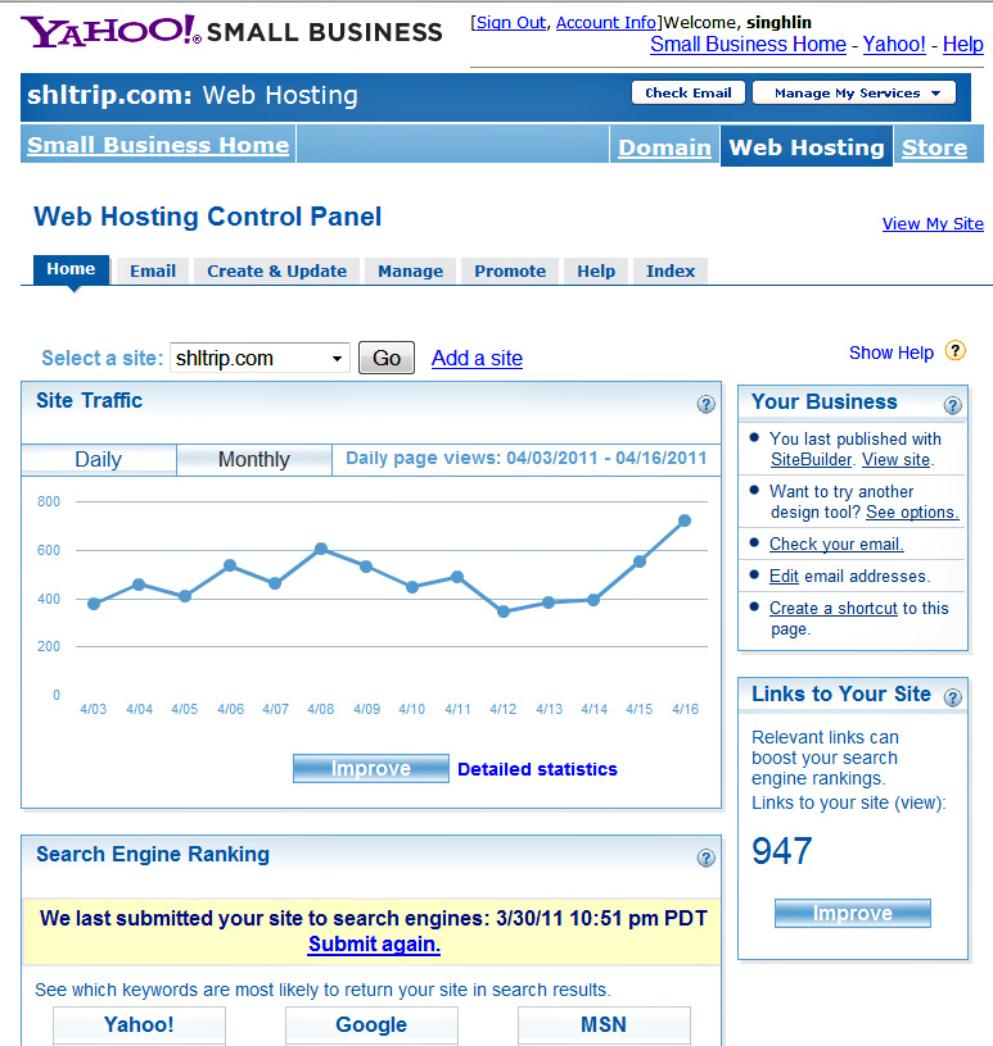
people about 400 to 800 times every day as shown in the following sample Daily Site Access Chart
provided by the Yahoo Web Hosting Service for the 2-week period from April 3 to April 17, 2011. Many
people all over the world have been enjoying the photos and the associated stories on my Travelogue
website.
Two key factors that make your pictures more useful to and appreciated by many people all over the
world are:
1. Upload the selected beautiful pictures onto a website on Internet so that those beautiful
pictures are accessible and visible by anybody and everybody in the whole world.
2. Write one or two paragraphs of narrative text as related to each beautiful picture for two
important reasons: (A) After seeing such beautiful pictures, many viewers are anxious to plan their
next sightseeing trip to go there to enjoy the beautiful place personally and more thoroughly. So,
information such as the name and the location of the beautiful place plus how to get there and your
experience are very useful and helpful to many viewers, (B) Such narrative text will make those
pictures searchable by various Internet search engines such as Google, Yahoo, Bing, etc. Without the
narrative text, the beautiful picture alone is NOT easy for anybody to search and to find it on the
Internet. Such beautiful pictures with no associated stories will be very lonely and are practically un-
searchable and un-accessible by anybody.
More than 95 % of viewers of my Travelogue (老林遊記 ) website come through Google Internet Search.
Retirees have the luxury to slow down, to listen, to observe, to create, and to spot life's many beautiful
moments; and they stop at those precious moments to enjoy them thoroughly through their capacity for
passion. There is much to taste of life in the “now”. So enjoy the experience. Live more in your heart and less in
your head. Dream more while you are awake. No one is in charge of your happiness except you. Enjoy the
best of humanity and the best of nature. Live every moment with Joy and Peace. Many of us never lose our
sense of wonder - a passion for exploration and discovery. They enjoy sightseeing trip frequently and take
many nice pictures and movie clips of those wonderful moments.
退休啊,是如此安詳、淡定、逍遙!
沒有了學業的壓力,
沒有了謀生的辛勞,
沒有了功名利祿的誘惑,
夕陽無限好, 珍惜吋光陰,
退休的人生啊,是如此從容、真實、美好!
每一天都是節日,每一天都是假日,每一天都是自由日!
每一天都是藝術節,每一天都是旅遊節,
從心所欲神仙境,
退休以後學會「慢城」哲學新潮流的慢生活,讓生活節奏回歸自然, 回歸心靈, 細細的品味享受典雅優質
的安逸生活, 過得從容,活得瀟灑, 柳暗花明又一村,過起了自由、輕鬆、自助、自信的老年生活:遊山
玩水、 逸養天年,充分享受豐富多采、舒心安逸的晚年生活, 學習著去感受美、欣賞美、去仔細觀察和贊
賞別人的優美,進而能與他人分享美。親情,老年時的保養品。快樂得不得了, 享受是一種美啊!放慢生
活的腳步,你會發現生活變得更加美好,發現 美好生活的新視野,培養豐美的感官經驗,讓視覺、味覺、
聽覺、嗅覺、觸覺的敏銳感受全面甦醒,五感六覺全都被喚醒,由此而能深刻體驗大自然之美與人間生活
之美,在美的世界當中感覺到生命本元的一種熱情,真正的快樂在寧靜平和,在雅緻的生活情趣;
不要把健康賣給時間跟壓力,不要再做時間的奴隸,睡到自然醒,是退休的好處,再不用被鬧鐘驚醒好
夢。慢下來去欣賞感受大自然豐富細膩的顏色, 到郊外草木間漫步,鳥語蟲鳴、花香綠蔭,重新享用那帶
著草根香的清新空氣與賞鳥的樂趣,在大自然引發自己、解放自己、做精神的釋放,美的覺醒,尋回童真
的樂趣與記憶,只有靜 才能聽到大自然的聲音,「美是無目的的快樂」,它沒有任何現世的功利,采菊
東籬下,悠然見南山, 逍遙自在,三五知己坐,淡茶話家常,悠閒自在, 放慢生活的腳步吧!成為身心五
感皆平衡的人,延年益壽, 健康 生活更美好!生命都一直在前進,把握當下,莫等待,人生並未售來回
票,失去的便永遠不再。
25歲到45歲,為錢做事; 45歲到65歲,為理想做事; 65歲退休以後悠哉遊哉為興趣做事。
In touring many beautiful national parks, as one travels along the magnificent parkway, jaw-dropping stunning
scenery keeps on unfolding in front of, behind, to the right side and to the left side of you. There is no let up
and your eyes are kept very busy. Some tourists said that when they were touring such fantastic highway, they
would not dare to blink their eyes because they did not want to miss those splendid scenery that kept on
unfolding. No matter from what angle you are shooting your camera, it is a dream-like artistic painting. It is a
paradise for photographers to take their endless dream shots. The pleasure and satisfaction for the tourists
and photographers are unparalleled.
生活美學大師蔣勳說 "想拓展人文視野,最好的辦法是:上山下海,打開你的眼睛"; 看美景、享美食,充
分享受美好生活,能在這麼美的地方, 看見全景, 真是壯觀, 沿路一幅幅絕色美景,應接不暇,美得令人陶
醉, 有拍不完、看不膩的連綿美麗景色,不論您從哪一個角度取景,每個畫面都有如夢幻般的詩畫, 都令
人流連忘返, 真的是看得滿足,拍得滿足,那份快感無與倫比. 真是再快樂不過了. 而追求唯美的攝影,可
以讓你去關注事物最美好的一面,提高審美能力,學會發現美,在此過程中真正做到賞心悅目。
我們多數人很難成為畫家或演員那樣的藝術家,但是我們很容易通過攝影進行藝術創作,進入美的境界,
從而使我們的胸懷,修養,眼界更上一個層次。當你在面對美景按下快門的刹那,你會興奮得發抖。當你
捕捉到特別的瞬間,你會為自己的創造力而狂喜。
旅遊攝影之後的很長時間人都是放鬆的;對於下一次旅遊拍攝也同樣充滿著期待,這種期待是我們平淡日
常生活的快樂調節劑。
旅遊是一種心靈的放空, 也是心靈的饗宴! 景色如彩虹般多采多姿, 如詩如畫, 更是一場知覺及視覺的饗宴,
大自然的優美,蜜靜,調諧, 巧妙地把氣氛、感情、景象融匯為意境,達到景中有情,情中有景, 接近自
然,回歸自然,融合自然, 與「西天的雲彩」的感情交流, 與大自然似乎有一種本能的感應和認同,與大自
然達成和諧,內心的性靈神韻同自然界溫馨靜謐的美妙相交融, 行雲流水般表現出來, 似禪界般空靈,含蓄
凝練,融情於景,寓景於情,天人合一, 有一種飄渺、虛幻的柔美感,有如仙境。
2. Greater Purpose in Life by Sharing the Joy of Life and Nature
人生三境界:一是做好自己,二是幫助周圍的人,三是幫助更多的
人。
孟子說:「窮則獨善其身,達則兼善天下」。
Some retirees have been doing volunteer charity work to help other people and to help some charity
organizations. Feel good about yourself. Do good things for others. Each day give something good to
others. As Lily Yeh of Barefoot Artists Inc. said that “Not that my light is shining brighter than
anybody else, we all have that inner light within us. My role is to light up other people’s pilot light so
that we all shine together.” Joy is a light that fills you with Hope, Faith and Love. In such spirit, to
have joy, one must share it. The heart that gives, gathers. We find joy in our hobbies of sightseeing
and photography. We treasure it and enjoy it even more when we can share our joy with our friends
and other people. While you meet something beautiful, the first thing you should do is to share it with
your friends anywhere, so that these beautiful things will be able to spread out literally around the
world. A heart of joy is a virtue that brings happiness to others like a spring breeze.
大家都喜歡到處旅遊,看美景、享美食,充分享受美好的生活,但是自得其樂之外,應該更上一層, 助人
為快樂之本, 好東西要與朋友和其他人分享, 生活的真蒂不在於你索取多少, 而在於你能給予社會和你的人
類同胞多少, 無私的分享很寶貴的旅遊歡樂經驗, 看到被幫助的人開心,就是最棒的. 把旅遊攝影作品與
人分享,你會有很大的成就感。在電腦後期處理旅遊照片時,有無法比擬的心理享受。
期待——發現——創作——成就——快樂,旅遊攝影令你的生活進入了良性迴圈。
According to Professor Tal Ben-Shahar in Harvard University on achieving happiness, Happiness lies
at the intersection between pleasure and meaning. Whether at work or at home, the goal is to engage
in activities that are both personally significant and enjoyable.
A new study at Rush University Medical Center of 1,238 older adults with average age of 78 found that
possessing a greater purpose in life is associated with 50% lower mortality rates among older adults.
(The study is published in the June 15, 2009 issue of the journal Psychosomatic Medicine.) Working
on my Travelogue website plus paying the fee for such Web Hosting Service is a way of labor of love
for me to contribute some joy to the society all over the world.
Remember,
GOOD THINGS ARE FOR US TO SHARE.....
The digital camera technologies have been advancing rapidly and have been making it easy for many
tourists, especially for retirees, to enjoy taking nice pictures or movie clips of beautiful sceneries on
their sightseeing trips. Photography is an interesting hobby that can brings out the creative instinct in
you if you have the passion for the art of digital photography. Camera lens has, therefore, becomes
our tool to share our joy with many friends and other people all over the world.
用眼睛看世界、用心靈留下美景的記憶, 用鏡頭萃取旅遊中的心、景、情的訣竅與美好, 攝影開啟了心靈與
自然對話的窗戶。用鏡頭和世界交朋友。 攝影所能給我們帶來的:採集美,體驗快樂,尋找責任,發現意
義,感受心靈成長的愉悅!.
What will matter is not your memories, but the memories that live in those who loved you. Time waits
for no one. Treasure every moment you have. You will treasure it even more when you can share it
with someone special. Photography is a way for you to create something and make your life more
zestful, more colorful, more meaningful and Just do it!
The benefits of using compact super-zoom cameras for such tourists are described in my Travelogue
web page at:
http://www.shltrip.com/Benefits_of_Compact_SuperZoom.html
3. Methods for Sharing the Joy of Life
Some people have been using some Internet Photo Sharing services to show their pictures with
corresponding captions to their friends. Some examples of Internet Photo Sharing services are: Flickr
(Yahoo), Picasa (Google), Shutterfly, etc. Some other people have been using PowerPoint files to
distribute their pictures and text to their friends. Yet some other people use Microsoft Word files with
pictures and text to distribute their pictures and experience to their friends. I have also used Internet
Photo Sharing service, PowerPoint files and Word files several years ago.
Then I learned from May Lee to use Yahoo SiteBuilder (YSB) to build my Travelogue website (老林遊記
):
http://www.shltrip.com/index.html
to share my pictures and the associated sightseeing experience with friends and other people all over
the world. In addition to still pictures, I also use YouTube website to share movie clips from my
sightseeing trips taken by my camera. My Travelogue website has been accessed by friends and other
people about 400 to 800 times every day as shown in the following sample Daily Site Access Chart
provided by the Yahoo Web Hosting Service for the 2-week period from April 3 to April 17, 2011. Many
people all over the world have been enjoying the photos and the associated stories on my Travelogue
website.
Two key factors that make your pictures more useful to and appreciated by many people all over the
world are:
1. Upload the selected beautiful pictures onto a website on Internet so that those beautiful
pictures are accessible and visible by anybody and everybody in the whole world.
2. Write one or two paragraphs of narrative text as related to each beautiful picture for two
important reasons: (A) After seeing such beautiful pictures, many viewers are anxious to plan their
next sightseeing trip to go there to enjoy the beautiful place personally and more thoroughly. So,
information such as the name and the location of the beautiful place plus how to get there and your
experience are very useful and helpful to many viewers, (B) Such narrative text will make those
pictures searchable by various Internet search engines such as Google, Yahoo, Bing, etc. Without the
narrative text, the beautiful picture alone is NOT easy for anybody to search and to find it on the
Internet. Such beautiful pictures with no associated stories will be very lonely and are practically un-
searchable and un-accessible by anybody.
More than 95 % of viewers of my Travelogue (老林遊記 ) website come through Google Internet Search.
After the download and installation of SB in your PC, you can access the free online tutorial of SB at:
http://webhosting.yahoo.com/ps/sb/tutorial/index.php
The following website provides additional information on SB
http://webhosting.yahoo.com/ps/sb/tour/index.html?p=1
http://webhosting.yahoo.com/ps/sb/tutorial/index.php
The following website provides additional information on SB
http://webhosting.yahoo.com/ps/sb/tour/index.html?p=1
Furthermore, there are 947 other websites that are linked to my Travelogue website on April 17, 2011. The
number of external websites that are linked to my Travelogue website is increasing as time marches on. For
example, this number has increased to 1727 on June 12, 2011.
I have also been receiving e-mail requests from friends and strangers asking me for permission to use my
photos on their brochures, articles or books to be published, or on their PC Screen Savers; and e-mail requests
for original photo files to make large photo prints of beautiful scenery to be framed and hanged on the walls in
their homes. A director of Recreation Program of a senior center told me that they are using my Travelogue
website as part of their tour guides. Another lady sent me a message to tell me that I have left lots of nice foot
steps on my Travelogue website for many other people to follow. These are all consistent with my spirit of
sharing the joy of my sightseeing trips with many people all over the world.
3.1. Benefits of Using Travelogue Website
Before I learned to build my Travelogue website, I was using PowerPoint (PP) files attached to e-mail to share
my photos and traveling experience with my friends. The size of these PP files ranges from about 2 MB to 7
MB. One day a friend told me his problem caused by such big PP files even though he enjoys those PP files. He
went on a trip for one week and he had no access to Internet and e-mail during that week. When he came
home after that week, his e-mail inbox was clogged up by several e-mails with big fat attached PP files such
that he missed many important e-mails which were rejected because his e-mail inbox was full. Beside my e-mail
with attached PP file, other friends were also forwarding other e-mails with attached big PP files to him.
Therefore, he urged me and other friends to use other method(s) to share the photos without clogging up his
inbox or inboxes of other friends. This problem gave me a strong incentive to learn to build my Travelogue
website to eliminate this problem of clogging up the e-mail inboxes of friends. By using Travelogue website, my
announcement e-mails to my friends are just a few lines of text and are very small and short (without those
attached big fat PP files).
Furthermore, the advantages of Travelogue website over other Internet Photo Sharing services are (1) more
freedom in controlling the size of photos on the screen, (2) more freedom in the amount of narrative footnote
describing my experience associated with each photo, and (3) the ability to link to other related photos and
stories in other web pages in my Travelogue website or in other outside websites. Feedback from many
readers of my Travelogue website told me that those narrative footnotes and additional information in the
related Internet linked web pages are very useful and helpful in their planning of their future sightseeing trips to
those beautiful places.
The additional benefits of using Travelogue websites are described in Section 5 below.
4. Yahoo SiteBuilder
Several friends have asked me over last few year period about how I build my Travelogue website. After
answering this same question several times, it is time for me to provide such answer on this web page so that
more people can also build their own Travelogue websites to share the joy of their wonderful pictures and their
sightseeing experience with many other friends.
Yahoo SiteBuilder (YSB) is very user friendly and easy to learn. Yahoo has free Online Tutorial to show you
how to create your own website easily. Learning to use YSB to build your own web page is almost like learning
to use Microsoft Word to generate a Word page with text and pictures. No computer software programming
skill is necessary. After the web page is generated on your PC using YSB, you press the “Publish” button on
YSB to publish the web page to Internet for other people to access and to see.
YSB also provides hundreds of templates to choose from, or you can choose to design your site on your own.
You can also modify a template to suite your need. SiteBuilder (SB) lets you use as much HTML as you like, or
you can build a completely functional and beautiful site without knowing any HTML at all.
It is "What You See Is What You Get" in the sense that the published web page will look exactly like the web
page you lay out on your PC screen. You have full control on (a) the size and location for each picture, (b) the
location, font size and color of each text paragraph, and (c) the background color of the web page. It took me
only 2 days from starting the online tutorial to publishing my first basic website on Internet. Then I learn more
features in YSB gradually to improve my basic web page.
5. Aabaco Small Business Spin Off from Yahoo
In 2015, Yahoo spun off its web hosting services into the new Aabaco Small Business. So, my Travelogue
Website was also transferred into and is being served by Aabaco Small Business with website at:
https://www.aabacosmallbusiness.com/webhosting
The SiteBuilder (SB) software program and its associated web hosting services have an extensive HELP menu
to explain how to use various features. Aabaco Small Business has technical support to help SB users.
SiteBuilder (SB) can be downloaded free from the following Aabaco Small Business website:
https://secure.webhosting.luminate.com/ps/sb/download.php
number of external websites that are linked to my Travelogue website is increasing as time marches on. For
example, this number has increased to 1727 on June 12, 2011.
I have also been receiving e-mail requests from friends and strangers asking me for permission to use my
photos on their brochures, articles or books to be published, or on their PC Screen Savers; and e-mail requests
for original photo files to make large photo prints of beautiful scenery to be framed and hanged on the walls in
their homes. A director of Recreation Program of a senior center told me that they are using my Travelogue
website as part of their tour guides. Another lady sent me a message to tell me that I have left lots of nice foot
steps on my Travelogue website for many other people to follow. These are all consistent with my spirit of
sharing the joy of my sightseeing trips with many people all over the world.
3.1. Benefits of Using Travelogue Website
Before I learned to build my Travelogue website, I was using PowerPoint (PP) files attached to e-mail to share
my photos and traveling experience with my friends. The size of these PP files ranges from about 2 MB to 7
MB. One day a friend told me his problem caused by such big PP files even though he enjoys those PP files. He
went on a trip for one week and he had no access to Internet and e-mail during that week. When he came
home after that week, his e-mail inbox was clogged up by several e-mails with big fat attached PP files such
that he missed many important e-mails which were rejected because his e-mail inbox was full. Beside my e-mail
with attached PP file, other friends were also forwarding other e-mails with attached big PP files to him.
Therefore, he urged me and other friends to use other method(s) to share the photos without clogging up his
inbox or inboxes of other friends. This problem gave me a strong incentive to learn to build my Travelogue
website to eliminate this problem of clogging up the e-mail inboxes of friends. By using Travelogue website, my
announcement e-mails to my friends are just a few lines of text and are very small and short (without those
attached big fat PP files).
Furthermore, the advantages of Travelogue website over other Internet Photo Sharing services are (1) more
freedom in controlling the size of photos on the screen, (2) more freedom in the amount of narrative footnote
describing my experience associated with each photo, and (3) the ability to link to other related photos and
stories in other web pages in my Travelogue website or in other outside websites. Feedback from many
readers of my Travelogue website told me that those narrative footnotes and additional information in the
related Internet linked web pages are very useful and helpful in their planning of their future sightseeing trips to
those beautiful places.
The additional benefits of using Travelogue websites are described in Section 5 below.
4. Yahoo SiteBuilder
Several friends have asked me over last few year period about how I build my Travelogue website. After
answering this same question several times, it is time for me to provide such answer on this web page so that
more people can also build their own Travelogue websites to share the joy of their wonderful pictures and their
sightseeing experience with many other friends.
Yahoo SiteBuilder (YSB) is very user friendly and easy to learn. Yahoo has free Online Tutorial to show you
how to create your own website easily. Learning to use YSB to build your own web page is almost like learning
to use Microsoft Word to generate a Word page with text and pictures. No computer software programming
skill is necessary. After the web page is generated on your PC using YSB, you press the “Publish” button on
YSB to publish the web page to Internet for other people to access and to see.
YSB also provides hundreds of templates to choose from, or you can choose to design your site on your own.
You can also modify a template to suite your need. SiteBuilder (SB) lets you use as much HTML as you like, or
you can build a completely functional and beautiful site without knowing any HTML at all.
It is "What You See Is What You Get" in the sense that the published web page will look exactly like the web
page you lay out on your PC screen. You have full control on (a) the size and location for each picture, (b) the
location, font size and color of each text paragraph, and (c) the background color of the web page. It took me
only 2 days from starting the online tutorial to publishing my first basic website on Internet. Then I learn more
features in YSB gradually to improve my basic web page.
5. Aabaco Small Business Spin Off from Yahoo
In 2015, Yahoo spun off its web hosting services into the new Aabaco Small Business. So, my Travelogue
Website was also transferred into and is being served by Aabaco Small Business with website at:
https://www.aabacosmallbusiness.com/webhosting
The SiteBuilder (SB) software program and its associated web hosting services have an extensive HELP menu
to explain how to use various features. Aabaco Small Business has technical support to help SB users.
SiteBuilder (SB) can be downloaded free from the following Aabaco Small Business website:
https://secure.webhosting.luminate.com/ps/sb/download.php
Then you are ready to follow the Online Tutorial to play with and to learn SB that has been installed in your PC.
To publish your website onto Internet, you will need a web hosting plan including (1) a domain name for your
website and (2) Web Hosting Service. Both of them can be obtained by accessing the following Aabaco Small
Business web hosting page:
https://www.aabacosmallbusiness.com/webhosting
The monthly price or annual price for such web hosting service are also on this web page.
To publish your website onto Internet, you will need a web hosting plan including (1) a domain name for your
website and (2) Web Hosting Service. Both of them can be obtained by accessing the following Aabaco Small
Business web hosting page:
https://www.aabacosmallbusiness.com/webhosting
The monthly price or annual price for such web hosting service are also on this web page.
There are probably other website building software tools that are also very user friendly, easy to learn and
easy to use. But I have no experience with other website building software tools. I have several years of
experience with SB (YSB) and its associated web hosting service from Aabaco Small Business (Yahoo) that I
can describe here on this web page. I hope that such information is useful to you if you are looking for a simple
and easy way to build your own website.
6. Networking with Many Friends and Strangers All Over The World
My Travelogue website has been attracting many visitors, friends and strangers all over the world through the
following networking processes:
6.1. Friends' Friends
When I complete and publish a new web page on my Travelogue website, I send an announcement e-mail to
many friends. If the content of the new web page is also of interest to the friends and relatives of my friends,
they may forward my e-mail announcement to their friends and relatives who may also forward the e-mail
announcement to their friends and relatives.
6.2. Internet Search Engines
SiteBuilder provides special spaces for a user to enter the title and some relevant keywords of the website and
of each web page. These titles and keywords are Internet search-able through various Internet search engines
such as Google, Yahoo, Bing, MSN, etc. Many people all over the world have found and reached my
Travelogue website through such Internet Search.
6.3. Internet Links
There are more than 1430 other websites that are linked into my Travelogue website as of May 24, 2011.
Some visitors of those 1430 or more websites came to visit my Travelogue website through those links that
they can click. The number of websites that are linked to my Travelogue website is increasing as time marches
on.
6.4. Inter-Linked Web Pages of Related Content
Some web pages in my Travelogue website have related content of common interest and I provide Internet
links among those related web pages. For example, in February 2006, I toured Bosque del Apache National
Wildlife Refuge (NWR) in New Mexico to see huge number (about 18,000) of red crowned sand-hill cranes in
their wintering ground at Bosque del Apache NWR as shown on my Travelogue web page at:
http://www.shltrip.com/Bosque_Del_Apache.html
Then in August 2009, I toured Creamer's Field Migratory Waterfowl Refuge in the heart of Fairbanks, Alaska to
see large number of red crowned sand-hill cranes in their autumn staging ground in Fairbanks to prepare for
their autumn migration flight south to Bosque del Apache NWR as shown on my Travelogue web page at:
http://www.shltrip.com/Go_To_See_Alaska_Part_5_Richardson.html
I provide Internet links between these two web pages so that visitors to the web page on sand-hill cranes in
Bosque del Apache NWR in New Mexico can also visit the related web page on sand-hill cranes in Fairbanks,
Alaska easily and vice versa.
6.5. E-Mail Interactions
In the "About Us" web page of my Travelogue website, there is a space for visitors to communicate with me by
e-mail interactions. I gained many new Internet/e-mail friends with common interest through this process.
6.6. Access Statistics
SB also has a Web Hosting Control Panel to show me various website access statistics such as (1) Daily Site
Access Chart as shown above, or (2) Monthly Site Access Chart, or (3) Access Counter of each individual web
page in my Travelogue website so that I know which web pages are more popular and which web pages are
less popular, etc.
6.7. Site Search Box
My Travelogue website ( WWW.SHLTRIP.COM ) now has a large number of web pages associated with large
number of my sightseeing trips. Some viewers have been using my Travelogue website as part of their tour
guide in their planning for their future sightseeing trips. To facilitate viewers to find any particular web page
relevant to the subject of their interest, I provide three methods for viewers to search to find a particular web
page of interest to the viewers. These three methods are described on my web [page at:
http://www.shltrip.com/index.html
6.8. Interactive Maps
The Travelogue website enables me to show the locations of various points of interest to viewers by links to
interactive Google Map or Bing Map, or MapQuest Map, etc. According to the feedbacks from viewers, such
interactive maps are very helpful to them in their planning for their sightseeing trips to tour those beautiful
places.
7. Advanced Features in SiteBuilder
I am not a software engineer. Therefore, I have been using only the simple basic features of SiteBuilder (SB)
and keeping my Travelogue website at fairly simple and basic level.
However, SB has substantial amount of advanced features for more advanced users to add many fancy
features onto their websites. Some examples are: (a) SB provides support for most FTP software, Flash,
Shockwave, videos, music, etc. (b) Includes 380+ customizable templates for business and hobby uses. (c)
You can easily change any template to create the site you want. (d) Drag-and-drop tools make it easy to add
new pages, change layouts, switch colors, edit text, etc. on the fly. (e) Add flair to your site with tables, royalty-
free graphics, and pre-built forms. etc.
8. A Strategy for More Effective Presentation of Photos on My Travelogue Website
My strategy for more effective presentation of my photos from a sightseeing trip on a web page usually does
not follow the chronological sequence of the pictures taken during the trip. For example, the first picture
position on the top of the web page is considered by me as the prime spot to show the most important picture
from this trip. I ask myself if I am allowed to show people only one picture from this trip, which one is that most
important picture? Therefore, I pick the best, the most beautiful and the most impressive picture from that trip
to present it up front on this top, primary position on this web page. Then I go down to the second spot to
show the second most impressive picture from this trip. In this way, the viewers are immediately impressed
when they open up this web page. With the good and strong initial impression, the viewers tend to have more
patience to follow through to see all the pictures and the associated stories on that web page.
On the other hand, if I were to follow the chronological sequence, the first five or ten pictures may be dull and
not very impressive. Some viewers, who are very busy and short of time, might get bored by the first few
unimpressive pictures and quit, such that they never got a chance to see the most beautiful pictures which were
buried way behind in # 18 or # 21 position according to the chronological sequence. This is my strategic
thinking on how to achieve more effective presentation of my pictures on my travelogue web page.
By using this strategy, my procedure for processing my pictures for presentation on my web page is:
(1) I create a new picture file folder with the name of “Selected Pictures” for storage of selected good
pictures worthy of consideration for presentation on my Travelogue web page. But I keep all the original
pictures without any changes or any photo editing in their original picture file folder. In case if I change my mind
later for any reason, I can always access the original photo file folder and make a new copy of the original
picture to do new and different photo processing.
(2) When I first review my pictures from a trip, I assign a priority star rating such as 1s, 2s, 3s, 4s, 5s,
etc. (meaning 1 Star, 2 Stars, 3 Stars, 4 Stars, 5 Stars, etc.) to each selected picture, make a copy of each
picture from the trip, prefix such star rating to the name of each selected picture and put the selected picture
with its star rating into the “Selected Pictures” folder.
(3) My photo management software then uses the first numeral in the names of the pictures to organize
and to sequence these selected photos with star ratings (i.e., grouping according to their star ratings).
(4) So, when I am ready to put my selected photos onto my Travelogue web page for a particular
sightseeing trip, I just follow the sequenced grouping of pictures in this “Selected Pictures” file folder, starting
with the selected pictures with the highest star rating, then go down the list toward those pictures with lower
star ratings. I stop at about 25 or less of pictures per web page per trip. Many uninteresting pictures with low
star ratings never get on my web page once I reach my typical limit of about 25 pictures per web page per trip.
In this way, I do not bother viewers with many boring, uninteresting pictures. I show them only those very
impressive pictures with high star ratings. The first picture on my Travelogue web page is always the most
important and the most impressive picture in that trip.
easy to use. But I have no experience with other website building software tools. I have several years of
experience with SB (YSB) and its associated web hosting service from Aabaco Small Business (Yahoo) that I
can describe here on this web page. I hope that such information is useful to you if you are looking for a simple
and easy way to build your own website.
6. Networking with Many Friends and Strangers All Over The World
My Travelogue website has been attracting many visitors, friends and strangers all over the world through the
following networking processes:
6.1. Friends' Friends
When I complete and publish a new web page on my Travelogue website, I send an announcement e-mail to
many friends. If the content of the new web page is also of interest to the friends and relatives of my friends,
they may forward my e-mail announcement to their friends and relatives who may also forward the e-mail
announcement to their friends and relatives.
6.2. Internet Search Engines
SiteBuilder provides special spaces for a user to enter the title and some relevant keywords of the website and
of each web page. These titles and keywords are Internet search-able through various Internet search engines
such as Google, Yahoo, Bing, MSN, etc. Many people all over the world have found and reached my
Travelogue website through such Internet Search.
6.3. Internet Links
There are more than 1430 other websites that are linked into my Travelogue website as of May 24, 2011.
Some visitors of those 1430 or more websites came to visit my Travelogue website through those links that
they can click. The number of websites that are linked to my Travelogue website is increasing as time marches
on.
6.4. Inter-Linked Web Pages of Related Content
Some web pages in my Travelogue website have related content of common interest and I provide Internet
links among those related web pages. For example, in February 2006, I toured Bosque del Apache National
Wildlife Refuge (NWR) in New Mexico to see huge number (about 18,000) of red crowned sand-hill cranes in
their wintering ground at Bosque del Apache NWR as shown on my Travelogue web page at:
http://www.shltrip.com/Bosque_Del_Apache.html
Then in August 2009, I toured Creamer's Field Migratory Waterfowl Refuge in the heart of Fairbanks, Alaska to
see large number of red crowned sand-hill cranes in their autumn staging ground in Fairbanks to prepare for
their autumn migration flight south to Bosque del Apache NWR as shown on my Travelogue web page at:
http://www.shltrip.com/Go_To_See_Alaska_Part_5_Richardson.html
I provide Internet links between these two web pages so that visitors to the web page on sand-hill cranes in
Bosque del Apache NWR in New Mexico can also visit the related web page on sand-hill cranes in Fairbanks,
Alaska easily and vice versa.
6.5. E-Mail Interactions
In the "About Us" web page of my Travelogue website, there is a space for visitors to communicate with me by
e-mail interactions. I gained many new Internet/e-mail friends with common interest through this process.
6.6. Access Statistics
SB also has a Web Hosting Control Panel to show me various website access statistics such as (1) Daily Site
Access Chart as shown above, or (2) Monthly Site Access Chart, or (3) Access Counter of each individual web
page in my Travelogue website so that I know which web pages are more popular and which web pages are
less popular, etc.
6.7. Site Search Box
My Travelogue website ( WWW.SHLTRIP.COM ) now has a large number of web pages associated with large
number of my sightseeing trips. Some viewers have been using my Travelogue website as part of their tour
guide in their planning for their future sightseeing trips. To facilitate viewers to find any particular web page
relevant to the subject of their interest, I provide three methods for viewers to search to find a particular web
page of interest to the viewers. These three methods are described on my web [page at:
http://www.shltrip.com/index.html
6.8. Interactive Maps
The Travelogue website enables me to show the locations of various points of interest to viewers by links to
interactive Google Map or Bing Map, or MapQuest Map, etc. According to the feedbacks from viewers, such
interactive maps are very helpful to them in their planning for their sightseeing trips to tour those beautiful
places.
7. Advanced Features in SiteBuilder
I am not a software engineer. Therefore, I have been using only the simple basic features of SiteBuilder (SB)
and keeping my Travelogue website at fairly simple and basic level.
However, SB has substantial amount of advanced features for more advanced users to add many fancy
features onto their websites. Some examples are: (a) SB provides support for most FTP software, Flash,
Shockwave, videos, music, etc. (b) Includes 380+ customizable templates for business and hobby uses. (c)
You can easily change any template to create the site you want. (d) Drag-and-drop tools make it easy to add
new pages, change layouts, switch colors, edit text, etc. on the fly. (e) Add flair to your site with tables, royalty-
free graphics, and pre-built forms. etc.
8. A Strategy for More Effective Presentation of Photos on My Travelogue Website
My strategy for more effective presentation of my photos from a sightseeing trip on a web page usually does
not follow the chronological sequence of the pictures taken during the trip. For example, the first picture
position on the top of the web page is considered by me as the prime spot to show the most important picture
from this trip. I ask myself if I am allowed to show people only one picture from this trip, which one is that most
important picture? Therefore, I pick the best, the most beautiful and the most impressive picture from that trip
to present it up front on this top, primary position on this web page. Then I go down to the second spot to
show the second most impressive picture from this trip. In this way, the viewers are immediately impressed
when they open up this web page. With the good and strong initial impression, the viewers tend to have more
patience to follow through to see all the pictures and the associated stories on that web page.
On the other hand, if I were to follow the chronological sequence, the first five or ten pictures may be dull and
not very impressive. Some viewers, who are very busy and short of time, might get bored by the first few
unimpressive pictures and quit, such that they never got a chance to see the most beautiful pictures which were
buried way behind in # 18 or # 21 position according to the chronological sequence. This is my strategic
thinking on how to achieve more effective presentation of my pictures on my travelogue web page.
By using this strategy, my procedure for processing my pictures for presentation on my web page is:
(1) I create a new picture file folder with the name of “Selected Pictures” for storage of selected good
pictures worthy of consideration for presentation on my Travelogue web page. But I keep all the original
pictures without any changes or any photo editing in their original picture file folder. In case if I change my mind
later for any reason, I can always access the original photo file folder and make a new copy of the original
picture to do new and different photo processing.
(2) When I first review my pictures from a trip, I assign a priority star rating such as 1s, 2s, 3s, 4s, 5s,
etc. (meaning 1 Star, 2 Stars, 3 Stars, 4 Stars, 5 Stars, etc.) to each selected picture, make a copy of each
picture from the trip, prefix such star rating to the name of each selected picture and put the selected picture
with its star rating into the “Selected Pictures” folder.
(3) My photo management software then uses the first numeral in the names of the pictures to organize
and to sequence these selected photos with star ratings (i.e., grouping according to their star ratings).
(4) So, when I am ready to put my selected photos onto my Travelogue web page for a particular
sightseeing trip, I just follow the sequenced grouping of pictures in this “Selected Pictures” file folder, starting
with the selected pictures with the highest star rating, then go down the list toward those pictures with lower
star ratings. I stop at about 25 or less of pictures per web page per trip. Many uninteresting pictures with low
star ratings never get on my web page once I reach my typical limit of about 25 pictures per web page per trip.
In this way, I do not bother viewers with many boring, uninteresting pictures. I show them only those very
impressive pictures with high star ratings. The first picture on my Travelogue web page is always the most
important and the most impressive picture in that trip.
In case if you see overlapped lines of text or some lines of text become obscured behind a picture on this web
page, please press these two keys "Ctrl +" simultaneously or these two keys "Ctrl -" simultaneously to change
the page magnification (zoom) factor to eliminate such problems.
page, please press these two keys "Ctrl +" simultaneously or these two keys "Ctrl -" simultaneously to change
the page magnification (zoom) factor to eliminate such problems.
| 讀萬卷書 行萬里路 |
